Log what happened.
Record a start today or on an earlier date. Add or correct the end date when you know it.
A simple period tracker
Log your dates. Check your cycle or calendar.
Get on with your day.
A web app. No account, ads, or subscription prompts.
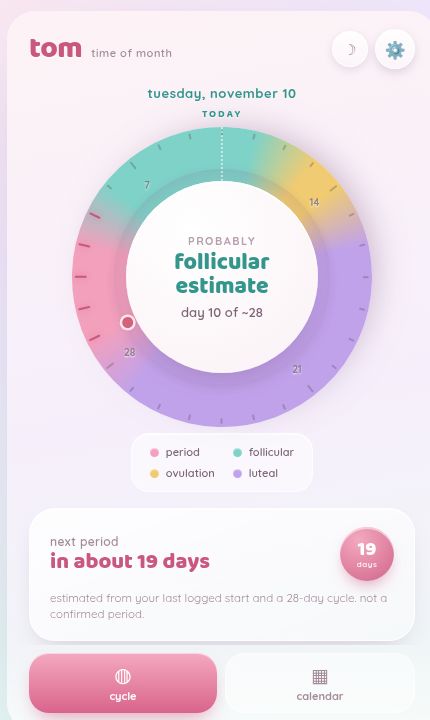
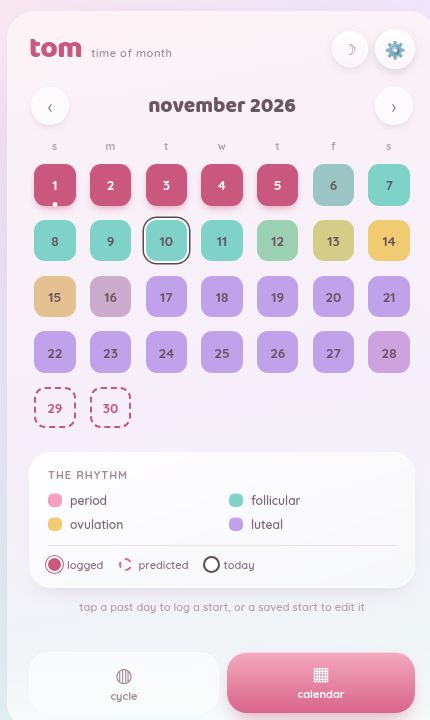
Two ways to see it
See where you are in your cycle, or look ahead to a particular date. Switch between them whenever you like.
The wheel places today within your estimated cycle. A separate card shows when your next period might begin.
Your logged dates inform the estimates. They don’t confirm a biological phase.
Move through the months, see past starts and expected dates, and tap a saved start to edit it.
Logged, predicted and today each have their own visual marker and a labeled key.
The essentials, close at hand
Tom is built for a small, familiar job: keeping track of your period. Your cycle and calendar are the main event. There’s no content feed to keep up with or daily checklist to complete.
Record a start today or on an earlier date. Add or correct the end date when you know it.
Change your usual cycle and period lengths. Tom can suggest updated averages from your recorded history.
Save a password-protected backup. Use it to restore your records or move them to another browser or device.
Privacy & control
Tom stores your period dates and cycle settings in your browser. No account to set up. No automatic cloud sync.
An optional passcode encrypts the records saved in your browser. You’ll find it in Settings, along with backup and restore.
Save an encrypted file with its own password. You choose where it goes and when to make another copy.
The app does not send your period dates or cycle settings to its server. Without the optional passcode, records are readable in browser storage. The passcode adds encryption to those saved records; it does not protect an unlocked app or a compromised device or browser.
Back up regularly. Clearing website data, losing your device, or browser storage being removed can erase records. Ordinary app updates are designed to preserve them. Different browsers and installed copies may have separate storage, so make a backup from the copy containing your records before moving or reinstalling.
The app passcode and backup password are separate, and neither can be reset for you. Keep your backup and its password somewhere safe. If you choose the plain JSON export option, that file is readable without a password. Files saved to a synced folder follow that service’s settings. Restoring a backup replaces the current records rather than merging them.
Loading or updating Tom still makes ordinary requests to its hosting service. The host can receive details such as your IP address and may use security cookies and request logs. Local record storage is not a promise of anonymity.
The colored phases and future dates are calculated from your entries and settings. They don’t confirm ovulation or predict fertility reliably. Tom is for keeping track, not medical advice or contraception.
Have a look
Open the app and enter your last period’s start date.
Or choose “just show me an example” to look around first.
On iPhone, open Tom in Safari, then choose Share → Add to Home Screen for quick access. If you already use Tom, open your existing copy to keep using the same stored records.